

Organizing an MiB event
Anyone can organize an event in MiB
Each local branch decides for itself what kind of events to organize and how often they will take place. Branches can set themselves targets for the number of events per month, but remember to keep the work fun. :)
ABC of event organizing
- the guide to organize MiB events
The ABCs of event organizing contains step-by-step instructions for organizing an event. It is worth reading the guide more than once, as it is a great help for both new and experienced actives!
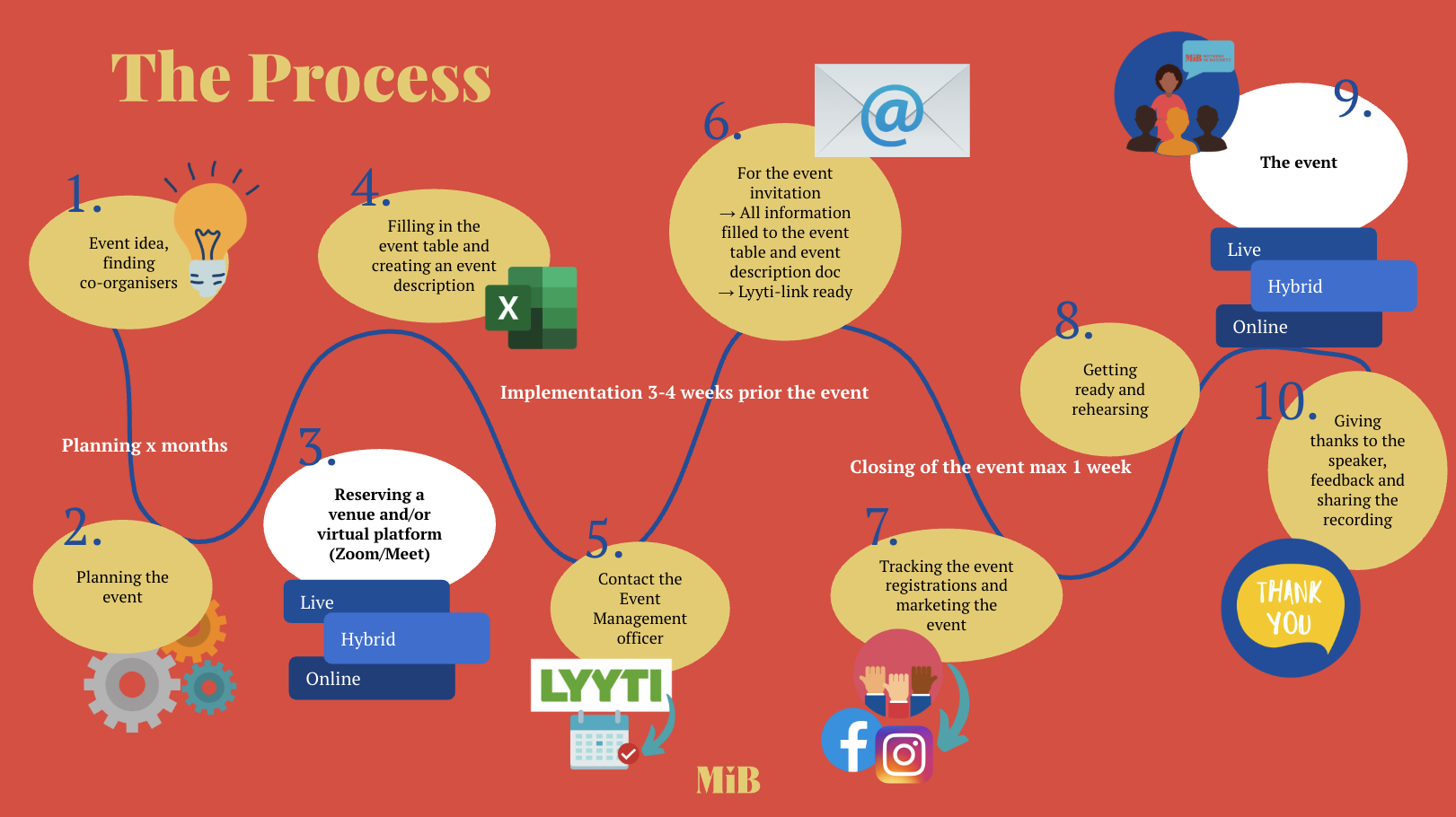











Help with brainstorming and putting together an event team
Help with putting together an event team on WhatsApp in the MiB community's General and shared -group
In this group, you can discuss anything related to organizing events or activities.

To support planning
The purpose and benefits of the event for participants have been considered
How the event will be held: live, hybrid, or online
Contacting the speaker
Date, time, and name of the event
Content planned and invitation written, presentation prepared if necessary
Should we create a Facebook event for your event for promotional purposes? We have created ready-made Canva design templates for cover photos for Facebook events. The cover photos are very simple.

Facilities and equipment for staging the event
Live event venue
You can find proven, rentable, or free live venues in the Live Venues tab of the event table. You can also search for a suitable venue yourself or ask your colleagues for recommendations. It is important to consider the accessibility of the venue, for example, for those arriving with strollers.
You can and should add new venues to the table!
Tools for online events
MiB uses Zoom and Google Meet for online events. Speakers/organizers can also use their own applications, such as Teams. If the event is being recorded, we recommend using Zoom.
Note: To see the icons, you must be logged in to Google and have joined the MiB Active group in Groups.

Event table and event texts
All events are recorded in the event table. The table should include information about the upcoming event as early as possible and be updated as the event arrangements progress.
The event invitation text is added to a separate document. When creating the invitation, read the instructions at the beginning of the invitation text document and refer to the sample text for writing the invitation.
Fill in all the fields in the table carefully, as the event management officer and employee will obtain all the information for registration and event invitations from the event table and invitation text document.

Registration for your event begins and invitations are sent out

Have you entered your event in the table and written the invitation text?
Have you marked the event status as Waiting for Lyyti in the event table?
The event management officer is responsible for creating the event in Lyyti and opening registration. In addition, they will create an invitation message based on the invitation text you write in Lyyti and are responsible for sending reminder messages to those who have registered for the event and feedback/thank you messages to those who have participated.
An employee will send invitations to your event to members who have subscribed to local invitations.
Invitations to individual live events and company visits are sent weekly on Wednesdays via Lyyti.
Invitations to online and hybrid events are sent as a summary invitation via the member register every other Wednesday.

Marketing!
You should and are allowed to promote your own event, especially on the local branches social media channels and your own channels, according to your own schedule. You can also share the public registration link for the event, as a membership number is required when registering for member events.
An employee will post about national events on MiB's national social media channels. It is also worth sharing these posts on local channels!
Paid marketing on social media
Upon request, the office can provide assistance with event marketing in the form of paid advertising. Paid advertising means that a visual advertisement for the event will be published on Facebook and Instagram for a selected period of time. The costs of paid advertising are low and are covered by the local branches own budgets. The ad requires an image, text, and a link to the event registration. We can use existing Lyyti invitation texts in the ads.
For more information on paid advertising, please contact: susanna.bergendahl(at)mib.fi

Dress rehearsals and the event itself!

Participants in live events must be marked as present in LyytiApp! This affects event statistics and expense reports.
If your event is open to everyone, explain what MiB is, why it is worth joining, and how to join. Presentation materials are provided for your convenience!
Encourage participants to network and meet each other, and get them involved in the activities!
Photography and social media
You can take photos and post on social media during the event, but please remember to inform participants about photography at the beginning of the event and allow them to opt out.
Let the good vibes be seen and heard! Save your photos to MiB Drive and use them on MiB's social media and the local social media channels. <3
By adding the image to the folder, you give us permission to use these images, for example, when advertising our activities.
Encourage participants to post about the event on social media! You can use the hashtag #mibtapahtumat and ask them to tag MiB's national social media accounts.

After the event, it still buzzes
Did you incur any expenses related to the event, e.g., did you buy refreshments with your own money? You can apply for reimbursement! However, please remember that the list of event participants must be up to date.
Feedback?
Go through the EVS feedback received via Lyyti. What went well? What should we pay attention to in the future? What did you learn from organizing this event? Was the event so popular that it is worth repeating later? Write down your observations!
Recording of the event
Once the event is over, upload the recording to either MiB Drive or YouTube. Please note that you must be logged in to Drive in order to use it!
Once you have downloaded the recording, send the name of the event, a link to the recording, and the viewing time to info(at)mib.fi so that an employee can add the link to the member portal for viewing.
”Be sure to thank the speakers and participants, but also yourself for organizing such a great event!”
Event fasilitating
= How to engage your event participants!
Facilitation is the goal-oriented guidance of group work, e.g., in workshops and events. Facilitation creates the conditions for equal participation among group members.
Facilitation focuses on creating the conditions for enriching and constructive cooperation. The facilitator "teaches people to fish," i.e., helps them do it themselves.
These tips will help you get started:
Get participants interested in the topic by reviewing the subject, program, purpose, and goal. Let people talk about their expectations.
Make good use of individual reflection as well as pair and small group work. These keep the mind more alert than listening to a monologue.
Write the discussion down in a group memory (such as on a flip chart) so that people don't have to strain to remember everything that was discussed.
Source: 17 vinkkiä fasilitointiin, GrapePeople
